Browser extension
Your honest match score —
on every job.
Climbr’s 0–100 match score and assisted autofill, on any job posting on the web. We make applying faster. We never apply for you.
Scoring and autofill work on every plan — Free and Basic get a weekly allowance, and it's unlimited once a Pro or Elite subscription starts. See plans →
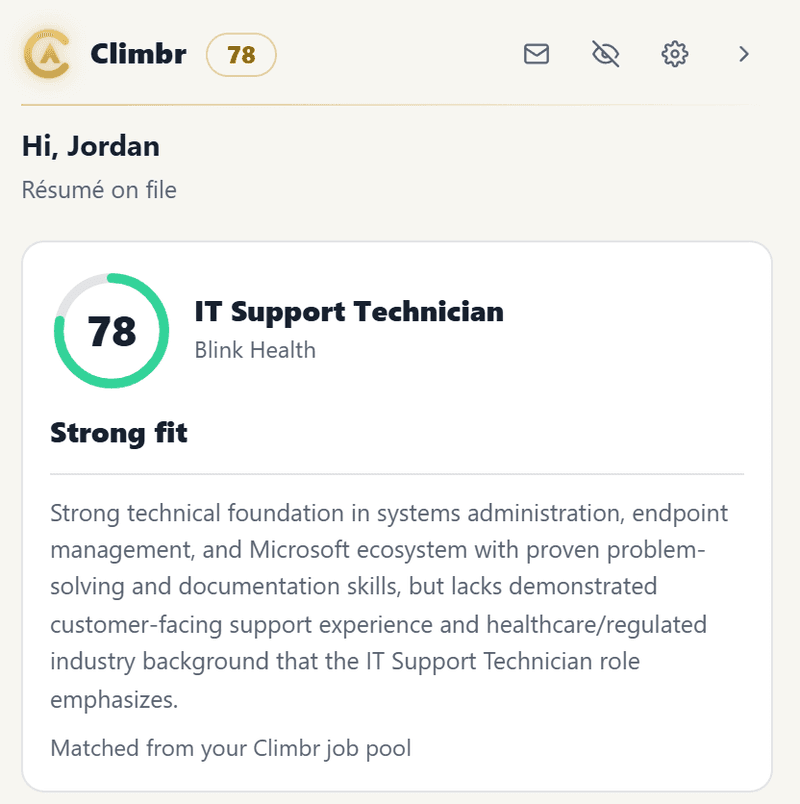
Honest match score on any job
A 0–100 score, verdict, and the one-line reason — scored against your real résumé — on LinkedIn, Indeed, Workday, Greenhouse and more. The same honest scoring as your dashboard, now anywhere you browse.
Save + score in one click
Clip any posting into your Climbr feed and tracker, with its score attached. No copy-pasting the link.
Assisted autofill
Fills your contact info, links, work authorization and more into application forms — and flags anything it isn’t sure about instead of guessing. It stops at the submit button.
Tailor for this job
Tailor your résumé to the posting you’re applying to, ground your answers in it, and keep a labeled library so you never upload the wrong one.
The honest part
Assist, never spam.
Never auto-submits. It fills the form and stops at the submit button. You review and click it.
Never fabricates. It fills only your real, stored answers — and leaves a field blank before inventing one.
Flags what it’s unsure of. If it can’t confidently map a field, it tells you to check it instead of guessing — the one thing no other autofill does.
No mass-apply. Quality over volume. It never fires off applications on your behalf.
Works on
Match scoring works on all of these — including cleared and federal roles on USAJOBS and ClearanceJobs. Autofill coverage varies by board — some fill completely, others partially, with a one-click copy-paste list covering anything that doesn’t auto-fill. Glassdoor, ZipRecruiter, USAJOBS, ClearanceJobs and Goldman Sachs Careers are score + save only (no fill surface on those boards — you apply through their own systems).
What it reads
Only the public job posting on supported job boards, and only while you’re viewing one — its title, company and description, to score it against your résumé — plus, when you run autofill on an application form, that form’s field labels so it can fill them with your saved data. It does not read your other tabs, your browsing, or any page outside those job boards, and it signs in with your existing Climbr login. See the Privacy Policy.
Get set up in Climbr first.
Build your résumé and pick a plan — the extension uses your Climbr account.